
Showing posts with label Scan n cut. Show all posts

Friday, 2 December 2022

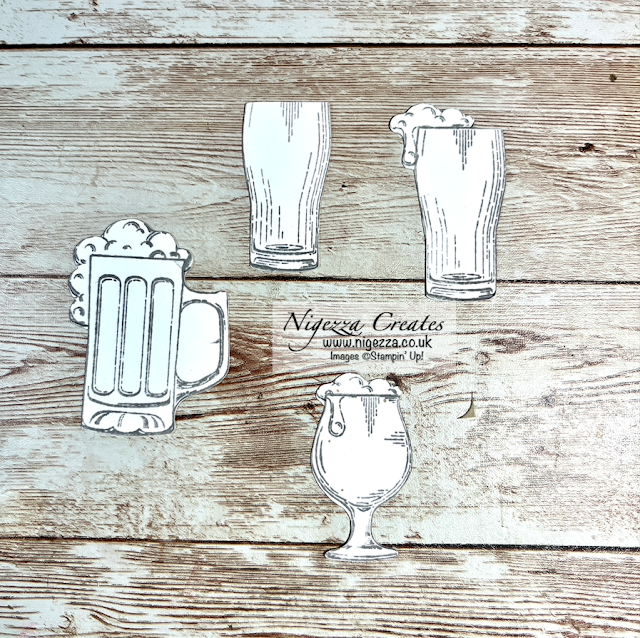
Cut Out Stamped Images Using The Scan N Cut

Nigezza Creates aka Gez, Independent Stampin' Up® Demonstrator 


Welcome to my blog, thank you for joining me today 😀

I am back with another video showing how I use my Scan N Cut in my Journal making.  Today I am cutting stamped images from Stampin' Up!  You have to make sure that there is a good outline. If there are gaps in the image then the machine will not pick it up and the cut will not be what you want. When this happens you need to draw a line in pencil, this can be rubbed out afterwards. 

You also have the choice whether to add a border or cut on the line. I like to cut on the line but it really is down to personal preference. 

I have to thank Ashley from Applelover53 who gave me lots of advice and has so many great videos on her YouTube channel,  

Cut Out Stamped Images Using The Scan N Cut

Video Tutorial


Time for the closeups!


Cut Out Stamped Images Using The Scan N Cut

Cut Out Stamped Images Using The Scan N Cut

Cut Out Stamped Images Using The Scan N Cut


I hope you like this project and will give it a try. To make sure you don't miss any of my projects why not subscribe to my YouTube channel and subscribe to my newsletter and click the button to follow my blog :-) 


I will be back tomorrow, until then ...

Happy Crafting!

Gez xxx 


Below are some of my favourite Stampin' Up! products to use when I am making junk Journals, if you click on the item it will take you directly to my shop where you can purchase the items.


Don't forget to use my host code to receive a share of the Stampin' rewards as a thank you for shopping with me :-)


Host code is CNXU3ZFS


Current Offers From Me


Click here to see my offers, kits and shares :-)


My Shop 


My shop is open 24/7 Click here to shop!


Don't forget to use my host code to receive a share of the Stampin' rewards as a thank you for shopping with me :-)

Host code is CNXU3ZFS


If your order is £150 or more before P&P then do not use the host code as you qualify for host rewards on your own and can chose what you want :-)


Joining Offer 

  • If you want to start a business for £99 then this is the way to do it!
  • Choose £130 worth of products from either the Mini Catalogue or the Annual Catalogue
  • You can also add products from the clearance rack and the kits that are available in my on line shop
  • No obligation to sell, make videos, blog etc
  • You can just join up and get the 20% discount for yourself

Follow me on Social Media

Friday, 25 November 2022

Using The Scan N Cut To Cut Images From DSP Designer Series Paper

Nigezza Creates aka Gez, Independent Stampin' Up® Demonstrator 


Welcome to my blog, thank you for joining me today 😀

I am back with another video showing how I use my Scan N Cut in my Journal making.   I am not one of these people who likes fussy cutting, my results are not great and with Rheumatoid Arthritis it does end up giving me lots of pain that can affect me for days.

Today I am cutting images from Stampin' Up! Designer Series Paper, one of the main reasons for getting it. You have to make sure that there is a good outline. If there are light sections then the machine will not pick it up and the cut will not be what you want. When this happens you need to draw a line in pencil, this can be cut out afterwards. 

You also have the choice whether to add a border or cut on the line. I like to cut on the line but it really is down to personal preference. I did cut one of the toad stools with a border so you can see the difference. 


I have to thank Ashley from Applelover53 who gave me lots of advice and has so many great videos on her YouTube channel,  

Using The Scan N Cut To Cut Images From DSP Designer Series Paper

Video Tutorial


Time for the closeups!

Using The Scan N Cut To Cut Images From DSP Designer Series Paper

Using The Scan N Cut To Cut Images From DSP Designer Series Paper

I hope you like this project and will give it a try. To make sure you don't miss any of my projects why not subscribe to my YouTube channel and subscribe to my newsletter and click the button to follow my blog :-) 


I will be back tomorrow, until then ...

Happy Crafting!

Gez xxx 


Below are some of my favourite Stampin' Up! products to use when I am making junk Journals, if you click on the item it will take you directly to my shop where you can purchase the items.


Don't forget to use my host code to receive a share of the Stampin' rewards as a thank you for shopping with me :-)


Host code is CNXU3ZFS


Current Offers From Me


Click here to see my offers, kits and shares :-)


My Shop 


My shop is open 24/7 Click here to shop!


Don't forget to use my host code to receive a share of the Stampin' rewards as a thank you for shopping with me :-)

Host code is CNXU3ZFS


If your order is £150 or more before P&P then do not use the host code as you qualify for host rewards on your own and can chose what you want :-)


Joining Offer 

  • If you want to start a business for £99 then this is the way to do it!
  • Choose £130 worth of products from either the Mini Catalogue or the Annual Catalogue
  • You can also add products from the clearance rack and the kits that are available in my on line shop
  • No obligation to sell, make videos, blog etc
  • You can just join up and get the 20% discount for yourself

Follow me on Social Media

Wednesday, 23 November 2022

Let's Make A Vintage Postcard From A Book Look Authentic

Nigezza Creates aka Gez, Independent Stampin' Up® Demonstrator 


Welcome to my blog, thank you for joining me today 😀


Last Friday I published my second video in my Scan N Cut series. I demonstrated how I use it to cut out images from a book. Today I am showing you how I turn these images into ephemera for my journals.  The postcard I cut out had a deckled edge, I show in the video last Friday how I was able to cut the exact same shape from tea dyed paper. This will allow me to make an authentic looking vintage postcard


Let's Make A Vintage Postcard From A Book Look Authentic


Video Tutorial


Time for the closeups!
Let's Make A Vintage Postcard From A Book Look Authentic

Let's Make A Vintage Postcard From A Book Look Authentic

Let's Make A Vintage Postcard From A Book Look Authentic

Let's Make A Vintage Postcard From A Book Look Authentic

Let's Make A Vintage Postcard From A Book Look Authentic

I hope you like this project and will give it a try. To make sure you don't miss any of my projects why not subscribe to my YouTube channel and subscribe to my newsletter and click the button to follow my blog :-) 


I will be back tomorrow, until then ...

Happy Crafting!

Gez xxx 


Below are some of my favourite Stampin' Up! products to use when I am making junk Journals, if you click on the item it will take you directly to my shop where you can purchase the items.


Don't forget to use my host code to receive a share of the Stampin' rewards as a thank you for shopping with me :-)


Host code is CNXU3ZFS


Current Offers From Me


Click here to see my offers, kits and shares :-)


My Shop 


My shop is open 24/7 Click here to shop!


Don't forget to use my host code to receive a share of the Stampin' rewards as a thank you for shopping with me :-)

Host code is CNXU3ZFS


If your order is £150 or more before P&P then do not use the host code as you qualify for host rewards on your own and can chose what you want :-)


Joining Offer 

  • If you want to start a business for £99 then this is the way to do it!
  • Choose £130 worth of products from either the Mini Catalogue or the Annual Catalogue
  • You can also add products from the clearance rack and the kits that are available in my on line shop
  • No obligation to sell, make videos, blog etc
  • You can just join up and get the 20% discount for yourself

Follow me on Social Media

Friday, 18 November 2022

Cutting Images From Books Using A Scan N Cut

Nigezza Creates aka Gez, Independent Stampin' Up® Demonstrator 


Welcome to my blog, thank you for joining me today 😀

I am back with another video showing how I use my Scan N Cut in my Journal making.   I am not one of these people who likes fussy cutting, my results are not great and with Rheumatoid Arthritis it does end up giving me lots of pain that can affect me for days. So I was delighted to discover that my Scan N Cut could be used to cut out images from books. When I first got it I just tried anything to cut out. I learned what would be successful and what I needed to do to make things work better. 

When cutting images from books or anywhere else the Scan N Cut will only cut an outline, so any part of the image that if what I call land locked will not cut out. You can see that from the  flower image. These can be cut later with a craft knife or left, sometime by adding ink with a blender tool it will just look like the background of what ever you are adding it to. 

The postcard had a ripped, deckled edge, obviously being a book page I will need to add a backing to it. So after cutting out the image I kept the information in the SNC and then loaded some tea dyed paper and cut this so it was the exact same shape as the postcard. So this can be added to the back. So clever, I love it.  

I have to thank Ashley from Applelover53 who gave me lots of advice and has so many great videos on her YouTube channel,  

Cutting Images From Books Using A Scan N Cut

Video Tutorial


Time for the closeups!

Cutting Images From Books Using A Scan N Cut

Cutting Images From Books Using A Scan N Cut

I hope you like this project and will give it a try. To make sure you don't miss any of my projects why not subscribe to my YouTube channel and subscribe to my newsletter and click the button to follow my blog :-) 


I will be back tomorrow, until then ...

Happy Crafting!

Gez xxx 


Below are some of my favourite Stampin' Up! products to use when I am making junk Journals, if you click on the item it will take you directly to my shop where you can purchase the items.


Don't forget to use my host code to receive a share of the Stampin' rewards as a thank you for shopping with me :-)


Host code is CNXU3ZFS


Current Offers From Me


Click here to see my offers, kits and shares :-)


My Shop 


My shop is open 24/7 Click here to shop!


Don't forget to use my host code to receive a share of the Stampin' rewards as a thank you for shopping with me :-)

Host code is CNXU3ZFS


If your order is £150 or more before P&P then do not use the host code as you qualify for host rewards on your own and can chose what you want :-)


Joining Offer 

  • If you want to start a business for £99 then this is the way to do it!
  • Choose £130 worth of products from either the Mini Catalogue or the Annual Catalogue
  • You can also add products from the clearance rack and the kits that are available in my on line shop
  • No obligation to sell, make videos, blog etc
  • You can just join up and get the 20% discount for yourself

Follow me on Social Media